
W-9 Example (Filled Form Explained)
If you need help understanding how a completed W-9 should look, this guide walks you through a simple W-9 example and explains each section of the form.
If you have not downloaded the form yet, see W-9 Form: Download, Instructions and Example. If you need detailed completion steps, see How to Fill Out a W-9.
What is a W-9 example?
A W-9 example shows how the form is typically completed so you can understand where to enter your name, business information, tax classification, address, taxpayer identification number, and signature.
This is especially helpful for freelancers, independent contractors, and sole proprietors who need to complete a W-9 for a client or payer.
Filled W-9 example
Below is a completed W-9 example that shows how each section of the form should be filled out.

Click the image to enlarge
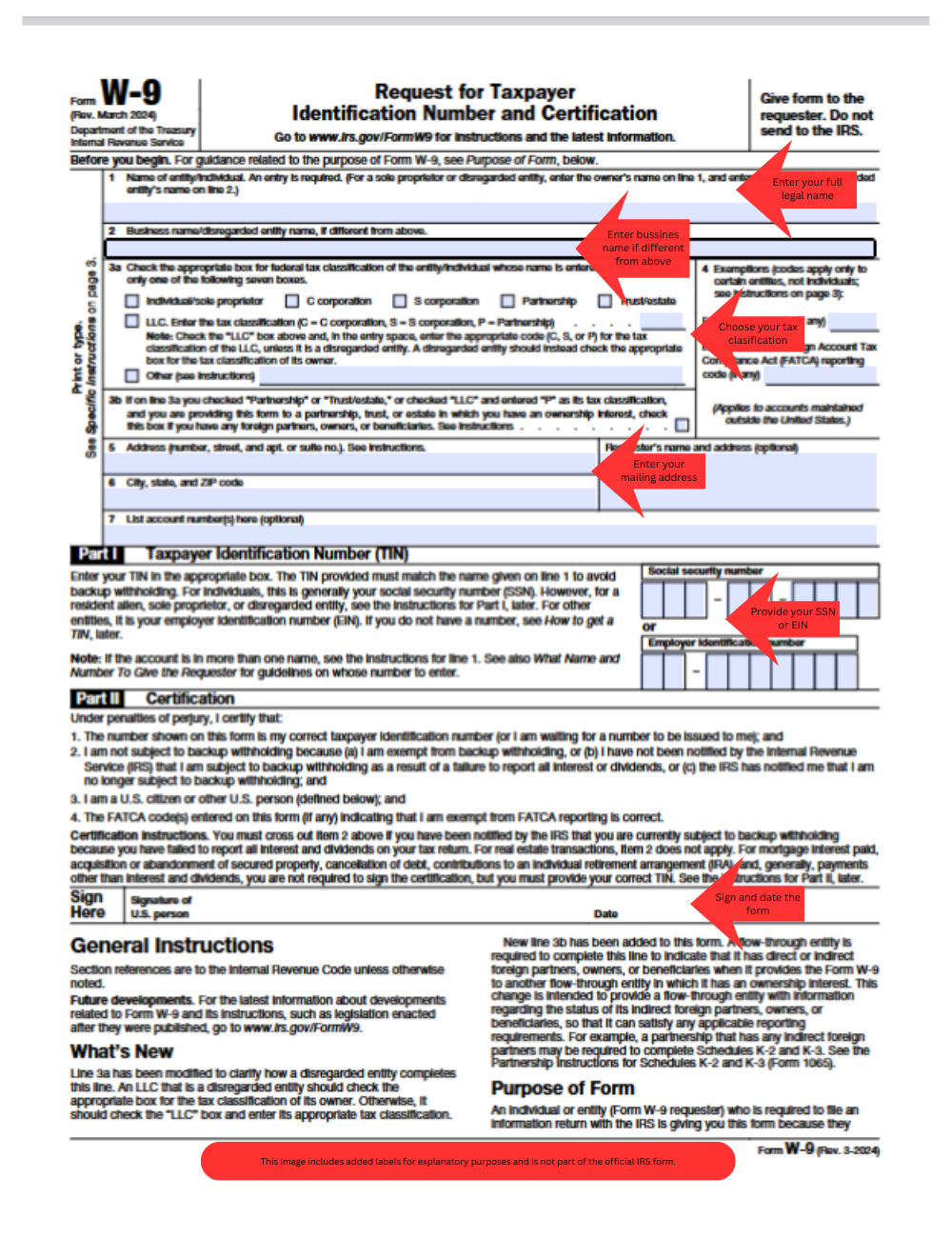
This example highlights where to enter your name, business information, tax classification, address, taxpayer identification number, and signature.
W-9 example explained field by field
1. Name
Enter your full legal name exactly as it appears on your tax return. This should match IRS records.
2. Business name
If you use a business name, trade name, or DBA, enter it on the second line. If you do not have one, you can usually leave this blank.
3. Federal tax classification
Select the option that applies to your tax status. Many freelancers choose Individual/Sole Proprietor, unless they operate under another structure such as an LLC or corporation.
4. Exemptions
Most individuals do not need to complete the exemption fields. If you are not sure whether they apply, review the IRS instructions before entering anything.
5. Address
Enter your mailing address, including city, state, and ZIP code. This is generally the address where tax documents may be sent.
6. SSN or EIN
Provide your taxpayer identification number. Individuals often use a Social Security Number, while some businesses use an Employer Identification Number.
7. Signature and date
Sign and date the form at the bottom. This confirms that the information on the W-9 is correct.
Sample W-9 for freelancers
If you are a freelancer or independent contractor, a typical W-9 example usually looks like this:
- your personal legal name on line 1
- your business or DBA name on line 2, if applicable
- Individual/Sole Proprietor selected as the tax classification
- your mailing address entered in the address section
- your SSN or EIN entered in the taxpayer identification number field
- your signature and date at the bottom
This is one of the most common ways a W-9 is completed, although your own form may differ depending on your business structure.
Common mistakes in a filled W-9
When reviewing a W-9 example, pay attention to these common mistakes:
- using a name that does not match tax records
- choosing the wrong tax classification
- entering an incorrect SSN or EIN
- forgetting to sign and date the form
- leaving important fields incomplete
Even a small mistake can lead to payment delays or reporting issues.
For a more detailed list, see Common W-9 Mistakes to Avoid.
Do not copy a sample exactly without checking your own details
A W-9 example is useful for understanding the layout of the form, but you should always enter your own legal and tax information.
Do not copy a sample name, taxpayer identification number, or tax classification unless it actually applies to you.
When should you use a W-9 example?
A filled W-9 example is useful when:
- you are completing a W-9 for the first time
- you want to make sure each field is completed correctly
- you are unsure which information goes where
- you want to avoid mistakes before sending the form to a client or payer
Frequently asked questions
What does a completed W-9 look like?
A completed W-9 includes your legal name, tax classification, address, taxpayer identification number, and signature.
Can I use a W-9 example to fill out my own form?
Yes, but only as a guide. You should always use your own correct tax and business information.
Is a W-9 example the same for everyone?
No. The overall structure is the same, but the tax classification and taxpayer identification number may differ depending on whether you are an individual, sole proprietor, LLC, partnership, or corporation.
Where do I send a completed W-9?
You normally send the completed form to the person or business that requested it, not directly to the IRS.
Related resources
- W-9 Form: Download, Instructions and Example
- How to Fill Out a W-9
- Who Needs to Fill Out a W-9?
- Common W-9 Mistakes to Avoid
- Form 1099-NEC
Final thoughts
A W-9 example makes the form much easier to understand. Once you see how each field works, completing your own W-9 becomes faster and more accurate.

Editor
25 years of experience managing tax, accounting, payroll, and employment-related information portals. Editor of Accounting Portal since 2011.
Read full bio →
Disclaimer
The information provided on Accounting Portal is for general informational and educational purposes only and does not constitute professional accounting, tax, financial, or legal advice.
While we strive for accuracy and timeliness, no representation or warranty is made regarding completeness or reliability. Always consult a qualified professional before making any business, tax, or financial decisions.
Neither Accounting Portal nor its authors are liable for any loss or damage resulting from the use of this information.
© 2026 Accounting Portal. All rights reserved.